
Upload a receipt. Get your books done.
Lemoney's AI reads any receipt, invoice, or bank statement, pulls out the details, and files it as a categorized expense. Then just ask it about your spending.
Trusted by small businesses



The receipts pile up. The data entry doesn't do itself.
Receipts in your inbox, your wallet, your camera roll. Invoices buried in email. Statements stuck in PDFs. Someone has to type it all in, categorize it, and remember what each charge was for.
Usually that someone is you. Usually at the worst possible time.

How It Works
Three steps, and most of them are the AI's. No spreadsheets, no manual data entry, no weekend bookkeeping marathons.
Upload anything
Drop in a receipt, a vendor invoice, or a bank statement, PDF or photo. One document or a whole batch.
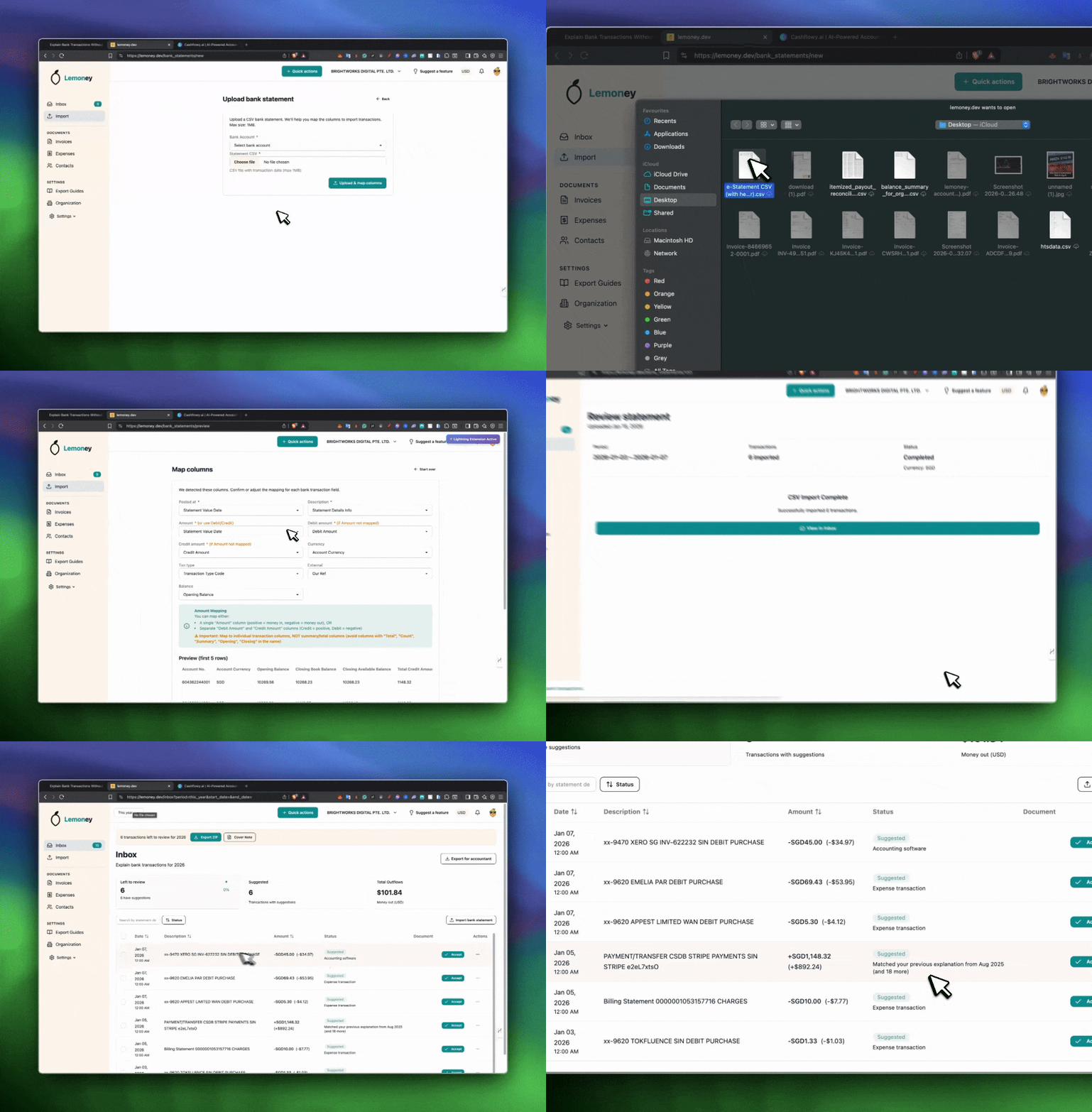
AI reads it and files it
Lemoney reads the whole document, vendor, amount, tax, date and line items, and turns it into a categorized expense automatically. You just review.
Ask your books anything
"What did I spend on software last month?" Your AI assistant answers from your real data, shows spend by category, and exports a clean CSV whenever you need one.
Ask, see, and export anytime
Save time first. Money follows.
The slow part of bookkeeping was never the thinking. It was the typing: keying in every receipt, looking up the right category, chasing down what a charge was for.
Lemoney does that part for you. Upload a document and the details are extracted, categorized, and explained in seconds. The numbers stay clean and consistent, so when your accountant steps in there's nothing to untangle.
No more manual data entry from receipts
Every expense categorized the moment it's uploaded
Answers about your spending in plain language
Clean reports ready to export whenever you need them
Lemoney doesn't replace your accountant. It hands them clean, categorized data instead of a shoebox of receipts, which usually means fewer billable hours and a smoother close.
Less typing. Less backtracking. Less stress.

AI that reads your documents, not just your mind.
We don't use AI to replace your judgment. We use it to remove the boring work.
Drop in a PDF or a photo and Lemoney reads the whole thing, merchant, amount, tax, date and line items, then files it under the right category as an expense. No templates, no manual fields. You review and you're done.
Get StartedBuilt for founders, not accountants
Built for small businesses and solopreneurs who want simple, stress-free money management, not a crash course in accounting.
Get startedAI reads any document
Receipts, invoices, bank statements, PDF or photo. The AI pulls out every detail so you never type them in.
Invoicing that works
Send clean invoices in seconds, with automatic totals and taxes. Get paid faster.
Ask your books
Chat with an AI assistant that answers from your real data. "What did I spend on software last month?" Done.
Spend by category
See exactly where the money goes, broken down by category, at a glance.
Export anytime
Pull a clean CSV of your expenses, documents, or transactions whenever your accountant needs it.
Works with any bank
Upload a statement from any bank in the world and we read it for you. No fragile API connections, no manual data entry.
Works on the go
Manage your money from anywhere. Mobile-friendly so you can track expenses on the fly.
Multi-currency support
Invoice in EUR, track expenses in USD, bank in SGD—we handle it all. Everything automatically converts to your base currency for easy reporting.
Fair pricing
All the essentials, none of the accountant-speak. Upgrade when your business is ready, not before.
Bulk upload
Drop in a whole folder of receipts at once. The AI works through them while you do something better.
Start free. No credit card required.
Try Lemoney risk-free. Upload a receipt, watch the AI book it for you, and see how easy bookkeeping can be. Upgrade when you're ready.
Free Trial
Try Lemoney risk-free
- 1 bank statement upload
- Explain up to 10 transactions
- Export preview
- Full access to core features
- No credit card required
Lemon Grow
Perfect for getting started
- Unlimited invoices
- Unlimited expenses
- Dashboard & analytics
- Multi-currency support
- 1 user
Lemon Pro
For growing businesses
- Everything in Grow
- Multi-currency support
- AI expense extraction
- From pictures & PDFs
- AI consolidations
- Unlimited users
Got questions?
Frequently Asked Questions
We've got answers. Here's everything you need to know about getting started with document-first, AI-powered bookkeeping.
You upload a document, a receipt, a vendor invoice, a bank statement, and Lemoney's AI reads it, pulls out the vendor, amount, tax and date, and files it as a categorized expense.
From there you can ask its AI assistant anything about your spending, see your costs broken down by category, and export a clean report whenever you need one.
No. That's the whole point.
You upload the document and the AI does the typing, the vendor, the amount, the tax, the date, the category. You just review what it found.
Receipts, vendor invoices, bank statements, and screenshots, as a PDF or a photo from your phone.
Upload one at a time, or drop in a whole batch and let the AI work through them.
It reads the document directly, so it's good at pulling out the vendor, totals, tax and dates and matching the expense to your categories.
Every expense it creates is saved as pending for your review, so you can correct anything before it's final. You stay in control.
Yes. Lemoney has an AI assistant that answers from your real data, not guesses.
Ask "what did I spend on software last month?" or "export my June expenses," and it queries your records and answers, with a downloadable CSV when you want one.
No.
Lemoney turns your documents into clean, categorized data. Your accountant still handles financial statements, tax filings, and compliance, just with far less cleanup to do.
All of them. You simply upload your bank statement and the AI reads it, no API connections, no waiting for bank approvals, no linking accounts.
It works with Chase, Bank of America, Wells Fargo, credit unions, international banks, you name it.
Lemon Grow ($9.99/month) includes unlimited invoices, unlimited expenses, the dashboard and category breakdowns, multi-currency support, and 1 user. Perfect for solopreneurs just getting started.
Lemon Pro ($39.99/month) includes everything in Grow, plus AI document reading and categorization, the AI assistant, and unlimited users. Great for growing businesses that want the books to run themselves.
All plans come with a 14-day free trial. No credit card required to start.
Yes. Export your expenses, documents, or transactions as a clean CSV anytime, either from the app or just by asking the AI assistant.
Everything is categorized and dated, ready to hand off.
We're here to help. Reach out anytime through our support chat and we'll get back to you quickly. There are simple guides built right into the app, so you can learn as you go.
Bookkeeping, finally automatic.
Upload your documents. Let the AI do the rest.
Free trial. No credit card. No accounting setup.